

Blue Sun Room GRAPHICS - IMAGES
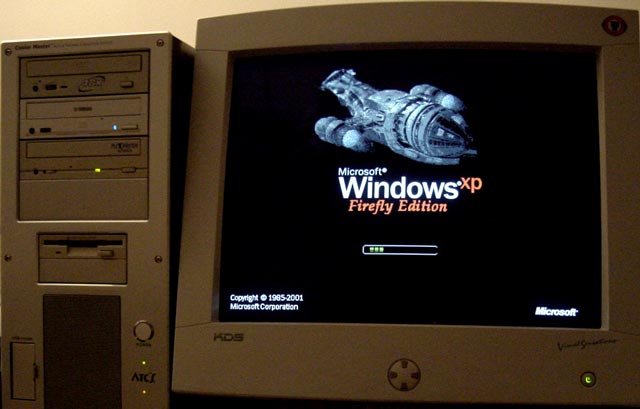
WindowsXP Firefly Edition now available to all. :smile:
Wednesday, August 18, 2004
Here you go fellow browncoats for those of you who have been requesting it.
It's now newly improved and tested on WinXP Home with SP1 and WinXP Pro with SP1 and ready to share. Let the downloads begin.
CATEGORY: GRAPHICS TIMES READ: 4015 RATING: 9.0 (G) SERIES: FIREFLY
Comments

Wednesday, 18 August 2004 08:54
Alright you guys i was on this for 5 hours to get everything up and working and tested. It's now 3:35AM and i am exhausted... but it's done and ready to be shared. It should only take about 2 or 3 minutes, after reading the directions, to complete the entire process so have at it, and let me know what you think of it by posting here.
It comes with full directions for making a backup, installing the new Boot Screen, and if you decide to, restoring the old boot screen back (not that you'd ever want to).
All you need are just basic computing skills (Copy/Paste) and the ability to follow directions.
Go to my Website here ---> http://www.MeChristopherRobin.com
Click on the buzz saw carving the word "Construction" and save the compressed file to your desktop. Extract the files within, read the directions, follow 'em carefully, and enjoy your new Firefly Edition of Windows.
It comes with full directions for making a backup, installing the new Boot Screen, and if you decide to, restoring the old boot screen back (not that you'd ever want to).
All you need are just basic computing skills (Copy/Paste) and the ability to follow directions.
Go to my Website here ---> http://www.MeChristopherRobin.com
Click on the buzz saw carving the word "Construction" and save the compressed file to your desktop. Extract the files within, read the directions, follow 'em carefully, and enjoy your new Firefly Edition of Windows.

Wednesday, 18 August 2004 11:30
Tomerai,
Your welcome.
Hey did you already pick out your new PC?
You know, i build pc's...(whistles innocuously)
Your welcome.
Hey did you already pick out your new PC?
You know, i build pc's...(whistles innocuously)
Wednesday, 18 August 2004 16:03
This will be shiny for my new laptop when it arrives. :)

Wednesday, 18 August 2004 16:23
Tried it and it works perfectly. No sweat installing it at all so...I'm sending some love your way as written in the instructions. Thank you!

Wednesday, 18 August 2004 16:38
Okay, I have it, saved it, and when I I click on it, it opens up the winzip and starts asking about adding files...
Am I doing something wrong here?
Am I doing something wrong here?

Wednesday, 18 August 2004 17:57
First, thanks for the great effort in putting this out to people. The screen looks awesome. Second, on the "I've included everything I could think of in the instructions" part, I've found a serious problem.
The directions ask you to check your version of Windows XP to insure that you are not running service pack 2 (SP2), which is incompatible.
If you click on "My Computer" and choose Properties as your directions suggest, you can be fooled into thinking you are running service pack 1 (SP1) when you are actually running parts of SP2 (even if you haven't downloaded it yet).
For example: My computer shows me using SP1, but if I restart my machine in "Safe Mode" I am actually running XP Build 2600.xpsp2.030422-1633: Service Pack 1 (don't worry about the numbers, just focus in on the sp2 portion of that line).
Because I use live update with windows, I have already downloaded many of the components contained in the new microsoft service patch (aka Critical Updates). As a result, my computer is no longer bootable if I attempt to make the change you suggest. Once I tried it, I could no longer boot my system in regular or safe mode.
The solution to my problem was to insert my bootable XP Pro CD and use the "Recovery Console" to change the files back. This unfortunately requires an understanding of the ancient language known as DOS.
Suggestion: In your instructions, ask people to go into safe mode to check their Windows Build version. It is automatically displayed at the top of the desktop in "Safe Mode"
Hope this helps :)
The directions ask you to check your version of Windows XP to insure that you are not running service pack 2 (SP2), which is incompatible.
If you click on "My Computer" and choose Properties as your directions suggest, you can be fooled into thinking you are running service pack 1 (SP1) when you are actually running parts of SP2 (even if you haven't downloaded it yet).
For example: My computer shows me using SP1, but if I restart my machine in "Safe Mode" I am actually running XP Build 2600.xpsp2.030422-1633: Service Pack 1 (don't worry about the numbers, just focus in on the sp2 portion of that line).
Because I use live update with windows, I have already downloaded many of the components contained in the new microsoft service patch (aka Critical Updates). As a result, my computer is no longer bootable if I attempt to make the change you suggest. Once I tried it, I could no longer boot my system in regular or safe mode.
The solution to my problem was to insert my bootable XP Pro CD and use the "Recovery Console" to change the files back. This unfortunately requires an understanding of the ancient language known as DOS.
Suggestion: In your instructions, ask people to go into safe mode to check their Windows Build version. It is automatically displayed at the top of the desktop in "Safe Mode"
Hope this helps :)
Wednesday, 18 August 2004 19:05
Hi All
First of all, thanks for doing this ChristopherRobin.
Now. Please don't think I'm complaining, I'm not... I had a bit of a problem, and I just wanted to let others know in case they are in the same situation as me.
Unlike Shakespeare, i'm definitely only running Service Pack1.
I followed the instructions, no problem. However, when I rebooted, my PC wouldn't reboot.
Fortunately I had my Windows XP installation CD and, like Shakespeare, we were able to use the DOS prompt to rename the copy of the original kernel file.
We suspect that it may be something to do with the Kernel settings. Being in the UK, maybe we have some "international" settings in there somewhere which makes the kernel file you provided incompatible with my PC.
I don't know how to check for such a thing, so I could be talking out of my elbow.
Anyway, please don't take this as a whinge or a complaint as it isn't meant like that at all.
I'll just listen to all my fellow browncoats saying how great it is and look wistful :)
First of all, thanks for doing this ChristopherRobin.
Now. Please don't think I'm complaining, I'm not... I had a bit of a problem, and I just wanted to let others know in case they are in the same situation as me.
Unlike Shakespeare, i'm definitely only running Service Pack1.
I followed the instructions, no problem. However, when I rebooted, my PC wouldn't reboot.
Fortunately I had my Windows XP installation CD and, like Shakespeare, we were able to use the DOS prompt to rename the copy of the original kernel file.
We suspect that it may be something to do with the Kernel settings. Being in the UK, maybe we have some "international" settings in there somewhere which makes the kernel file you provided incompatible with my PC.
I don't know how to check for such a thing, so I could be talking out of my elbow.
Anyway, please don't take this as a whinge or a complaint as it isn't meant like that at all.
I'll just listen to all my fellow browncoats saying how great it is and look wistful :)

ANONYMOUS
Wednesday, 18 August 2004 22:00
Shakespeare,
Thank you for your response.
I believe my instructions said "not tested with service pack2" rather than "incompatible with service pack2"
as i don't have the full install of Service pack2 i have no way to test if it will work or not.
I recommended those people with Service pack2 not try this.
However I also use WindowsUpdate and like you I have two pc's right here that in safe mode show
Microsoft Windows XP (Build2600.xpsp2.30422-1633:Service Pack 1) Still Service Pack 1 but with some components of xpsp2 installed. Those components also show up in "controlpanel - add remove programs" But they are both still service pack 1 machines.
It worked just fine on both pc's first try. No errors, and after updating the boot screen and installing again it still went in correctly first time with no erreors.
Perhaps there is some other variable we are over looking.
Ahh i believe Britchick may have something. Another thing i can't possibly test for is International versions of Windows. Shakespeare are you by chance outside the United States?
I will take it down from my site untill i figure out if this indeed due to interational versions of Windows being incompatible. It may only work for people in the US.
Shakespeare or Britchick could either of you send me a copy of your original ntoskrnl.exe file in my email.
I'll get to work on this right away. The blue mailbox on my site will link you to my yahoo account.
Thanks also to you Britchick for your great insight and pointing out something i had overlooked and my apologies to you both for the inconvienences.
Thank you for your response.
I believe my instructions said "not tested with service pack2" rather than "incompatible with service pack2"
as i don't have the full install of Service pack2 i have no way to test if it will work or not.
I recommended those people with Service pack2 not try this.
However I also use WindowsUpdate and like you I have two pc's right here that in safe mode show
Microsoft Windows XP (Build2600.xpsp2.30422-1633:Service Pack 1) Still Service Pack 1 but with some components of xpsp2 installed. Those components also show up in "controlpanel - add remove programs" But they are both still service pack 1 machines.
It worked just fine on both pc's first try. No errors, and after updating the boot screen and installing again it still went in correctly first time with no erreors.
Perhaps there is some other variable we are over looking.
Ahh i believe Britchick may have something. Another thing i can't possibly test for is International versions of Windows. Shakespeare are you by chance outside the United States?
I will take it down from my site untill i figure out if this indeed due to interational versions of Windows being incompatible. It may only work for people in the US.
Shakespeare or Britchick could either of you send me a copy of your original ntoskrnl.exe file in my email.
I'll get to work on this right away. The blue mailbox on my site will link you to my yahoo account.
Thanks also to you Britchick for your great insight and pointing out something i had overlooked and my apologies to you both for the inconvienences.

Wednesday, 18 August 2004 22:03
Danm dude, you rock, never have I seen a browncoat put so much effort into making info on how to do it manually because I tried that bootxp program and frankly, it sucked. Anyway, thanks to britchick and shakespeare for posting problems with their systems, each computer has a different personality and a pc can do anything at anytime!! So thanks again and I can't wait untill your site is up and running!!!
So thanks again and I can't wait untill your site is up and running!!!
Wednesday, 18 August 2004 22:05
...into making other browncoats happy!! Thanks for the info...
Must have hit the delete by mistake.
Must have hit the delete by mistake.
ANONYMOUS
Wednesday, 18 August 2004 22:05
Shakespeare,
One other thing you noted you couldn't get back into safe mode either? Is this accurate as "Safe mode" occurs before and does not require a boot screen. It should still be possible to use the recovery steps in my instructions to just switch the files back without resorting to the Recovery Console.
Britchick you as well did you try my recovery steps first.
One other thing you noted you couldn't get back into safe mode either? Is this accurate as "Safe mode" occurs before and does not require a boot screen. It should still be possible to use the recovery steps in my instructions to just switch the files back without resorting to the Recovery Console.
Britchick you as well did you try my recovery steps first.
Wednesday, 18 August 2004 22:11
Hi again CR
Please don't take it down from your website, as other many people have installed it without any problems, and I really don't want to spoil others fun.
I will email you my kernel file now...
Please don't take it down from your website, as other many people have installed it without any problems, and I really don't want to spoil others fun.
I will email you my kernel file now...
Wednesday, 18 August 2004 22:21
Just read your reply to Shakespeare.
After making the change, I booted up normally and nothing happened. I switched the PC off and booted up in safe mode. It went to a screen where it was checking some files and just...hung on a particular filename - I cna't remember which one. I tried again, same thing.
That's when we dug out the XP cd and put it in. We then went through the Recovery Console, etc etc.
Sounds to me like maybe Shakespeare's problem and mine might be the same after all?
Have emailed you my original kernel file, in case you want to have a look - but please don't feel as though you have to. You've already spent so much time on a kind gesture for the browncoat community, and I don't want this to become a monkey on your back/pain in the a**/other suitable phrase.
Hazel
After making the change, I booted up normally and nothing happened. I switched the PC off and booted up in safe mode. It went to a screen where it was checking some files and just...hung on a particular filename - I cna't remember which one. I tried again, same thing.
That's when we dug out the XP cd and put it in. We then went through the Recovery Console, etc etc.
Sounds to me like maybe Shakespeare's problem and mine might be the same after all?
Have emailed you my original kernel file, in case you want to have a look - but please don't feel as though you have to. You've already spent so much time on a kind gesture for the browncoat community, and I don't want this to become a monkey on your back/pain in the a**/other suitable phrase.
Hazel
Wednesday, 18 August 2004 22:48
Well let's see, I have the excact same numbers popping up at the top of my safe mode screen as shakespeare and mine is working shinier than ever!! Sorry if that is dissapointing to you shakes but I would just like to point out that that is most likly not the problem. Anyway, I hate to ask more of you Chris R. but I am just curious on what you used to create the ntoskrnl file? No explinations, you have done enough of that allready, just wondering how you made it. And also I think the programers who came up with naming a good number of the boot files "kernal" were obviously on somthing, most likly crack, I have never to this day figured out why someone would name a boot file after a seed... tsk tsk oh well!!

Wednesday, 18 August 2004 22:52
Oh come on, just put the pic up - we'll figure out how to work it later
Wednesday, 18 August 2004 22:52
Britchick/Hazel
Thanks so much for your understanding.
Truth be told this was originally just something of a neat trick i was doing for my self and on pc's i built for others to get people who had never heard of Firefly curious about it. My own little way of expanding the fanbase, but it was only on boxes i had control of and i never planned to release it to the world. I know there are so many variables in windows pc's around the world and so many different skill levels amongst users. Yet so many posted and emailed me asking for it that i was torn between wanting to share and possibly causing pc problems to peoples boxes i've never even met.
Several people just wanted the file and didn't even want to wait for the instructions because they "know all that stuff already."
In the end i decided to wait on posting the file untill i could have full instructions ready and compress them together into a file, so you can't get one without the other, and to try and make the best directions i could, let others point out ways to make it better (thanks guys) and try to help any people with problems.
I will however try my best to make your british version work for you. But i won't be able to test it without your help again since it probably will not work on my machines.
Since you already know how to recover from it if it doesn't work would you be willing to try again. At least i would know if i should put it up again for use in the US only or if other versions will work as well. If you do not wish to try again i completely understand. Let me know.
Thanks so much for your understanding.
Truth be told this was originally just something of a neat trick i was doing for my self and on pc's i built for others to get people who had never heard of Firefly curious about it. My own little way of expanding the fanbase, but it was only on boxes i had control of and i never planned to release it to the world. I know there are so many variables in windows pc's around the world and so many different skill levels amongst users. Yet so many posted and emailed me asking for it that i was torn between wanting to share and possibly causing pc problems to peoples boxes i've never even met.
Several people just wanted the file and didn't even want to wait for the instructions because they "know all that stuff already."
In the end i decided to wait on posting the file untill i could have full instructions ready and compress them together into a file, so you can't get one without the other, and to try and make the best directions i could, let others point out ways to make it better (thanks guys) and try to help any people with problems.
I will however try my best to make your british version work for you. But i won't be able to test it without your help again since it probably will not work on my machines.
Since you already know how to recover from it if it doesn't work would you be willing to try again. At least i would know if i should put it up again for use in the US only or if other versions will work as well. If you do not wish to try again i completely understand. Let me know.
ANONYMOUS
Wednesday, 18 August 2004 23:00
Ok I will put it back up now and just caution those outside the US to please wait untill i can investigate further.
It should be back in a minute or two.
It should be back in a minute or two.

Wednesday, 18 August 2004 23:10
Legomaniac:
Thanks buddy for confirming it was not a Windows Update of Sp2 components issue. That is the same result i experienced.
In answer to your question i didn't create the kernel file.
I made a copy of the existing one, then used a hacking utility to disasemble it and then editied the bitmaps in photshop and then recompiled it.
I agree kernel is a stange name for a file.
Thanks buddy for confirming it was not a Windows Update of Sp2 components issue. That is the same result i experienced.
In answer to your question i didn't create the kernel file.
I made a copy of the existing one, then used a hacking utility to disasemble it and then editied the bitmaps in photshop and then recompiled it.
I agree kernel is a stange name for a file.
Wednesday, 18 August 2004 23:43
Off to a meeting, be back later tonight to work on this some more.
Cheers people.
Cheers people.
ANONYMOUS
Thursday, 19 August 2004 09:12
Hi CR
Yes, I'd be happy to try again... but only if you want to. I don't want you to feel you have to try and fix this :))
btw, I think its called "Kernel" because it's kind of the windows shell. Which is what a kernel is. At east, that's what I assumed.
Yes, I'd be happy to try again... but only if you want to. I don't want you to feel you have to try and fix this :))
btw, I think its called "Kernel" because it's kind of the windows shell. Which is what a kernel is. At east, that's what I assumed.
Thursday, 19 August 2004 11:43
GwenHarker:
Sorry i have taken so long to respond.
I haven't used WinZip since finding WinRAR. I've found it to be a little more comprehensive and a little simpler for me.
I'd say give Winrar a try.
It's free to try and you can just uninstall or delete it afterwards if you like.
You can get WiRAR at Cnet Downloads here --->
http://www.download.com/WinRAR/3000-2250-10259256.html?tag=lst-0-1
Anyone else have more experience with WinZIP that can answer her question?
Sorry i have taken so long to respond.
I haven't used WinZip since finding WinRAR. I've found it to be a little more comprehensive and a little simpler for me.
I'd say give Winrar a try.
It's free to try and you can just uninstall or delete it afterwards if you like.
You can get WiRAR at Cnet Downloads here --->
http://www.download.com/WinRAR/3000-2250-10259256.html?tag=lst-0-1
Anyone else have more experience with WinZIP that can answer her question?
Thursday, 19 August 2004 12:06
Neo Doug1:
It's possible. I could extract it out, but i don't think it would be of any use to people because it is actually multiple bitmaps working together that create the boot screen image. Any one of them alone would just be a fragment, and if i were to post the fragment that has the ship in it (i assume that is the one you are asking about) it by itself can't be used as a boot screen without the other fragments and it's too small to make a good desktop image, and it's only 4 bit color slightly modified by me so there are certainly better images of Serenity out there or even screen caps.
Why would anyone want a low res, 4 bit color, hacked fragment of a boot screen that doesn't work by itself? Also you can't see it without getting the proper plugins for your image editing app (photoshop or whatever you use) that windows uses. The bitmap is literally just a black screen with nothing on it.
It's possible. I could extract it out, but i don't think it would be of any use to people because it is actually multiple bitmaps working together that create the boot screen image. Any one of them alone would just be a fragment, and if i were to post the fragment that has the ship in it (i assume that is the one you are asking about) it by itself can't be used as a boot screen without the other fragments and it's too small to make a good desktop image, and it's only 4 bit color slightly modified by me so there are certainly better images of Serenity out there or even screen caps.
Why would anyone want a low res, 4 bit color, hacked fragment of a boot screen that doesn't work by itself? Also you can't see it without getting the proper plugins for your image editing app (photoshop or whatever you use) that windows uses. The bitmap is literally just a black screen with nothing on it.
Thursday, 19 August 2004 14:09
Back after many distractions...
Looks like the transition between SP1 and SP2 is not the culprit. With BritChick’s comments, it’s starting to sound like it could be an issue with the different flavors of Windows and their various eccentricities. She has an International British Version. I have a USA Student Education Discount Version ($5 from the local University). I’m guessing you have the OEM or Retail Version.
One the positive side, if you are interested in tracking this problem down, BritChick and I are having the identical problems. On normal boot, the computer hangs at the point it would display the Firefly XP logo. Going the “safe mode” route, the computer starts to load in safe mode and then hangs on a file.
I’ll send you the kernal file. Thanks again :)
Looks like the transition between SP1 and SP2 is not the culprit. With BritChick’s comments, it’s starting to sound like it could be an issue with the different flavors of Windows and their various eccentricities. She has an International British Version. I have a USA Student Education Discount Version ($5 from the local University). I’m guessing you have the OEM or Retail Version.
One the positive side, if you are interested in tracking this problem down, BritChick and I are having the identical problems. On normal boot, the computer hangs at the point it would display the Firefly XP logo. Going the “safe mode” route, the computer starts to load in safe mode and then hangs on a file.
I’ll send you the kernal file. Thanks again :)
Thursday, 19 August 2004 16:28
The "Anonymous" saying she's happy to try again, is me. I must've got logged out, sorry.
Thursday, 19 August 2004 20:57
Hmmm... I'm having exactly the same problem as BritChick and Shakespeare, and being a DOS moron, had to do a system repair. I'll just echo and reafferm the voices of others about the problem, as my windows is a dell-modified version that was bundled with my XPS. Thanks again for posting the file, however, and I'll just keep hoping :)
ANONYMOUS
Thursday, 19 August 2004 22:35
A safer method might be to build a bootskin using your images and this program-
http://www.stardock.com/products/bootskin/
http://www.stardock.com/products/bootskin/
Thursday, 19 August 2004 22:36
Sorry that was moi. If I had your Serenity bitmap I might be able to try it.
Thursday, 19 August 2004 22:58
BritChick: Great. Thanks, I am currently working on your kernel to see what i can discern... It may just be that each different version requires you to start with that versions kernel file to make it compatible but it's far too early too know that. Much testing will need to be done first i certainly cannot promise anything.
Static: Hey man i got your email, Thanks. A step-by-step thingy is already included when you download the file from my site. Read the Word file called Directions first and take note of the posts above and know what version of Windows you have.
Static: Hey man i got your email, Thanks. A step-by-step thingy is already included when you download the file from my site. Read the Word file called Directions first and take note of the posts above and know what version of Windows you have.
Thursday, 19 August 2004 23:29
Shakespeare: I have all four, OEM version of WinXP Pro and Home, and Retail version of WinXP Pro and Home on a variety of boxes.
Don't have the S.E.D. version you mention though.
The first part you mention
>>>On normal boot, the computer hangs at the point it would display the Firefly XP logo<<<
is what's to be expected if an error is found in the NT kernel.
It's the second part you and Britchick mention about hanging in safe mode that i have never experienced and is a concern for me as it defeats what would otherwise be a simple 1 minute fix of just copy/paste back the original file and all is Shiny again.
Don't have the S.E.D. version you mention though.
The first part you mention
>>>On normal boot, the computer hangs at the point it would display the Firefly XP logo<<<
is what's to be expected if an error is found in the NT kernel.
It's the second part you and Britchick mention about hanging in safe mode that i have never experienced and is a concern for me as it defeats what would otherwise be a simple 1 minute fix of just copy/paste back the original file and all is Shiny again.
ANONYMOUS
Thursday, 19 August 2004 23:30
Britchick and Shakespeare: I just thought of something you guys could do for me that would be of great help if either or both of you are willing. After reading Daedalus's post (thanks for posting your story my friend) It occurred to me you guys had a very similar issue arise, and that the two of you corrected it in a similar fashion (recovery console) but the third not knowing how had to do a system repair (Daedalus can you be specific in what exactly you had to do? was it a reinstall of the OS?)
If you guys could write out what you saw (and the file name it hung on if you can remember it) and the steps you used to recover I could add them to the directions and that way any people with a different form of windows from the ones I have who encounter this can benefit from your experiences and recover much easier.
I would of course give you full credit (if you care) for any contributions. Thanks in advance for considering.
If you guys could write out what you saw (and the file name it hung on if you can remember it) and the steps you used to recover I could add them to the directions and that way any people with a different form of windows from the ones I have who encounter this can benefit from your experiences and recover much easier.
I would of course give you full credit (if you care) for any contributions. Thanks in advance for considering.
Friday, 20 August 2004 00:48
Hey guys here is a sneak peak at my latest.
It's not ready yet and i am still working to resolve the "different version of Windows issue" but i couldn't contain refrain from posting any longer...
How about Captain Tight Pants Edition.
Let me hear what you guys think
It's not ready yet and i am still working to resolve the "different version of Windows issue" but i couldn't contain refrain from posting any longer...
How about Captain Tight Pants Edition.
Let me hear what you guys think
Saturday, 21 August 2004 13:29
Britchick: I applied my modifications to your (british version) Kernel file
and will email it to you this morning.
Try it and let me know what result you get. :)
and will email it to you this morning.
Try it and let me know what result you get. :)
GREENARROW
Sunday, 22 August 2004 05:54
(Posting this here and at the OOB, so you see me sendin' you some love as requested asap! Wait, that sounds bad--it's in the instructions people, honest!)
---
Brother, **never** before have I wanted Windows to take *longer* to boot up! I installed it on my XP Home SP1 laptop, and it works dandy!
I'm gonna try in the Fall to put this on the office comp. that I'm sharing with four or five people, at least one of whom is a Browncoat who, while I think we would disagree on a lot of things, will join me in doing this!
In which case anyone who says anything vaguely negative about it may well be met with, "What??!?!?!?! How could you not have heard about this?!?!?!? It's the new XP-BDM based on the BDH model by CR (aka Christopher Robin)! Are you slow er som'thin'?!" Which should confuse 'em long enough to let us keep it...
One thing: mebbe an extra waring at the top of the *.rtf: "WARNING: if you've had one too many glasses of wine 'with dinner', do this later! 'cuz even if you know what yer doin', it will take twice as long!" Oh, wait, mebbe that just applies to me. (as if ya couldn't tell from this post!)
To All: Has anyone tried this on an SP 2 machine yet? If ya have, a post "to me" on the OB would be nice (havin' trouble readin' all the posts... see the last paragraph. ;) )
---
Brother, **never** before have I wanted Windows to take *longer* to boot up! I installed it on my XP Home SP1 laptop, and it works dandy!
I'm gonna try in the Fall to put this on the office comp. that I'm sharing with four or five people, at least one of whom is a Browncoat who, while I think we would disagree on a lot of things, will join me in doing this!
In which case anyone who says anything vaguely negative about it may well be met with, "What??!?!?!?! How could you not have heard about this?!?!?!? It's the new XP-BDM based on the BDH model by CR (aka Christopher Robin)! Are you slow er som'thin'?!" Which should confuse 'em long enough to let us keep it...
One thing: mebbe an extra waring at the top of the *.rtf: "WARNING: if you've had one too many glasses of wine 'with dinner', do this later! 'cuz even if you know what yer doin', it will take twice as long!" Oh, wait, mebbe that just applies to me. (as if ya couldn't tell from this post!)
To All: Has anyone tried this on an SP 2 machine yet? If ya have, a post "to me" on the OB would be nice (havin' trouble readin' all the posts... see the last paragraph. ;) )
Sunday, 22 August 2004 11:42
Hey you guys. How cool is this!!!
Adam Baldwin saw my "Hero Edition" boot screen http://www.fireflyfans.net/bluesun.aspx?bid=1831
and responded to me with a post over on the O.B.
The thread is here ---> http://forums.prospero.com/n/main.asp?qu=++For+Adam+Balwin+%26+Jayne+fans++&find=Search&webtag=foxfirefly&ctx=search&cl=639936&af=
Adam Baldwin saw my "Hero Edition" boot screen http://www.fireflyfans.net/bluesun.aspx?bid=1831
and responded to me with a post over on the O.B.
The thread is here ---> http://forums.prospero.com/n/main.asp?qu=++For+Adam+Balwin+%26+Jayne+fans++&find=Search&webtag=foxfirefly&ctx=search&cl=639936&af=
Monday, 23 August 2004 20:34
Just back from out of town. How did the modifications to BritChick's file go? Let me know if you still want that hanging file name...
BTW, Awesome Baldwin Screen, too cool that he responded :)
BTW, Awesome Baldwin Screen, too cool that he responded :)
Tuesday, 24 August 2004 02:46
Thanks Sahkespeare, yeah i know i was totally pumped about it.
Yes i would still like the name of the file it got hung on in safe mode. Haven't heard back from britchick yet but i'll post here as soon as i do.
Yes i would still like the name of the file it got hung on in safe mode. Haven't heard back from britchick yet but i'll post here as soon as i do.
Thursday, 26 August 2004 21:14
Looks like we finally have a solution to the problem. My "Student" version is the culprit (small price to pay when you're getting WindowsXP Pro for $5). Anyway, unless you're running a student version, I think you should have no problem (although I am not sure what was up with BritChick's version).
Thursday, 26 August 2004 21:17
Answered my own question posting to the other board. Britchick has a foriegn version, I have a student version. Those are both incompatible.
Saturday, 28 August 2004 10:15
HI CR
I'm really really pleased to report that the new version of the kernel is woring for me! yay!
I'm now the proud owner of the "Blue Sun" boot up screen. Thank you so much for takig the time to get this sorted out for me :)
I'm really really pleased to report that the new version of the kernel is woring for me! yay!
I'm now the proud owner of the "Blue Sun" boot up screen. Thank you so much for takig the time to get this sorted out for me :)
ANONYMOUS
Tuesday, 12 October 2004 02:05
so, does it work with service pack 2?
ANONYMOUS
Wednesday, 26 April 2006 13:04
Very good site, congratulations! <a href="http://christ.seekmat.com/index.html"jesus christ wallpaper</a>
Post Your Comments
You must log in to post comments.