

Tutorial - How To Post Images & Avatars at Fireflyfans.net
POSTED BY: Penguin
UPDATED: Sunday, June 5, 2011 21:00
VIEWED: 16793
PAGE 1 of 4

Images
First of all, the image must be somewhere on the net. Many people use Photobucket ( http://photobucket.com/). The image must be in a format the site can read. I know that .png images will not work. If the image is in a .png format, you can use an image manipulation program (MS Paint, Photoshop, etc.) to change the image to a .gif or .jpg format.
Images can be taken from existing websites. You may need to save the image to your computer and upload it somewhere on the web because some webmasters don’t allow hotlinking (direct linking to images) or the website may be changed and your image may disappear.
Getting Images From The Web
Let’s post the picture of Joss from the FireFoxFans.net home page.

In Firefox, Right-click on the image, go to “Copy Image Location” and click. This puts the address of the image in your clipboard. 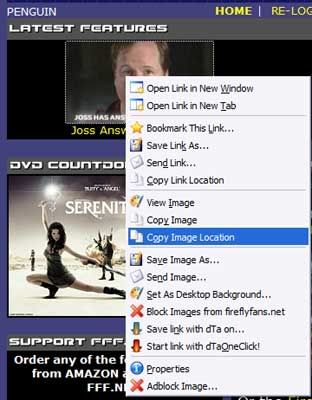

In Internet Explorer, right-click on the image and take your curser to “Properties” and left-click. 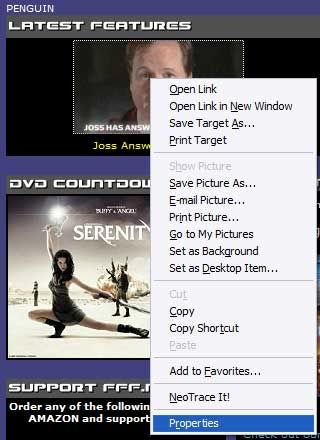
A “Properties” box will pop up.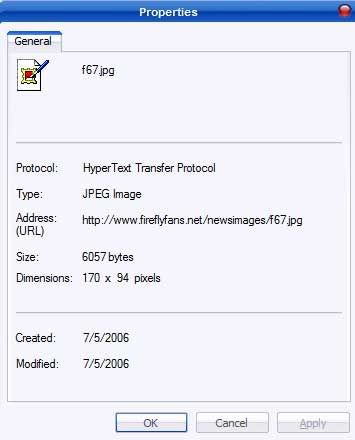
With your curser, highlight the Address: (URL) and right-click (or right click on the address and go to Select All).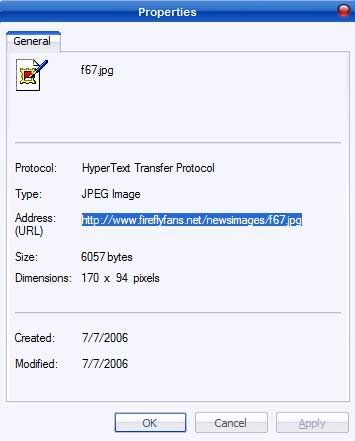
Take the curser to “Copy” and left-click. 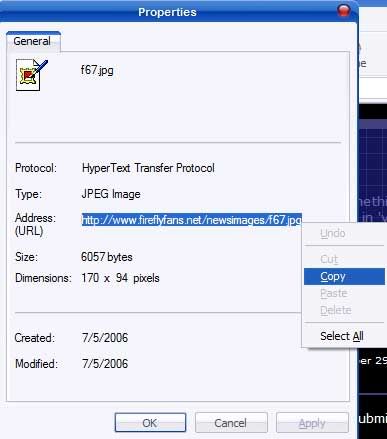
This puts the address of the image in your clipboard.
Posting the Image
Now that you have the image address, go to the thread where you want to place the image. Right-click inside the “Your Response” box. A pop-up box will appear. 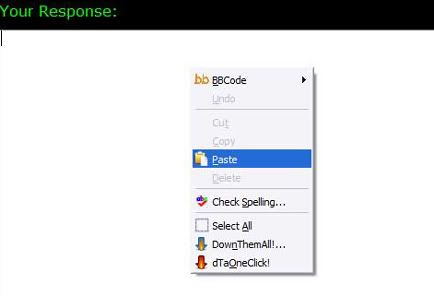
Take the curser down to “Paste,” left-click, and the image address should appear.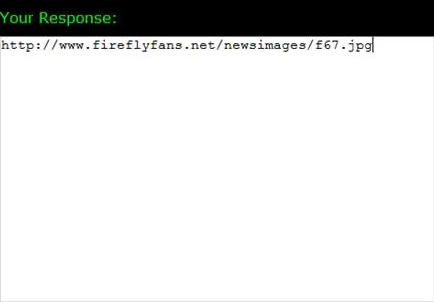
A note…this method only works at Fireflyfans.net. On most web sites, the use of “image tags” is required.
Posting an Image From Photobucket
Note...Photobucket has recently changed so all you need to do is left click the URL LINK you want and the link will be copied to your clipboard. Then follow the instructions in Posting the Image.
If you have a Photobucket account (or are “borrowing” an image), go to the image.
Left-click on the “Url” address to highlight…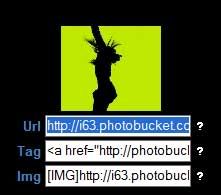
Right-click to bring up the pop-up box and left-click on copy.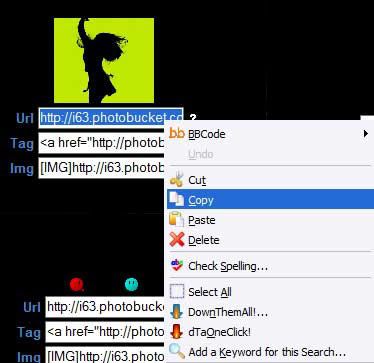
Then follow the instructions in Posting the Image.
Avatars
Recently a couple of our members discovered a way to allow us to have our own avatars!
Avatar images are different from other images you can post on FFF.net because they require the use of image tags. Image tags are characters around the image link that allow the image to be seen.
The image tags that are needed for avatars are  before the image link (no spaces) and
  after the image link (again, no spaces).
Posting the Avatar
Go to “MY FIREFLY” and then to “EDIT PROFILE” under “MEMBER OPTIONS.” In the “Tag:” box, enter the image link with the image tag. You can also add text.
You also need to choose the “None” option under the “Avatar” section. The original avatar you chose may still show up until you clear your browser cache.
NOTIFY: N | REPLY | REPLY WITH QUOTE | PERMALINK | TOP | HOME
Please use this thread for information only and test your avatar and images in one of the "test" threads. This makes it easier to fine and open the thread!
The well dressed one...
NOTIFY: N | REPLY | REPLY WITH QUOTE | PERMALINK | TOP | HOME

Thank you so much for the repost, Penguin!
I'm just going to put this up because a few people have been confused as to the difference between the URL and the HTML and why you need one for posting and the other for avatars. I don't know why it is, just how it is. The only place you need HTML is in you tagline, thus: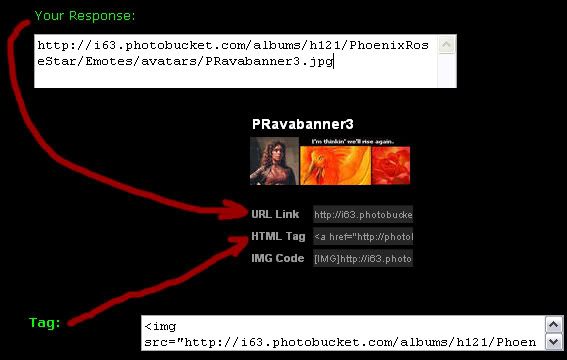
Here are some image test threads that I found tucked away in troll country:
http://www.fireflyfans.net/mthread.asp?b=15&t=29288
http://www.fireflyfans.net/mthread.asp?b=15&t=21986
http://www.fireflyfans.net/mthread.asp?b=15&t=28661
http://www.fireflyfans.net/mthread.asp?b=15&t=26915
Everyone please use these or start one of your own so this wonderful tutorial doesn't get too weighed down!
NOTIFY: N | REPLY | REPLY WITH QUOTE | PERMALINK | TOP | HOME

bump 
"We need to keep our heads so we can ... keep our heads."
NOTIFY: Y | REPLY | REPLY WITH QUOTE | PERMALINK | TOP | HOME

Thank you oh great and mighty penguin, I offer a fish for thanks.
~*~*~*~*~*~*~*~*~*~*~*~*~*~*~*~*~*~*~*~*~*~*~*~*~
~*Peter* Peter*; power *re-peater*~
`@/
/Y
/_)
*Petrelli for President. Together we can soar.*
**********~~~~~~~~~~~~~~~~~~~~~~~~~~~~~~~
**********~~~~~~~~~~~~~~~~~~~~~~~~~~~~~~~
**********~~~~~~~~~~~~~~~~~~~~~~~~~~~~~~~
**********~~~~~~~~~~~~~~~~~~~~~~~~~~~~~~~
**********~~~~~~~~~~~~~~~~~~~~~~~~~~~~~~~
HEROE'S IS MY CRACK!
~*~*~*~*~*~*~*~*~*~*~*~*~*~*~*~*~*~*~*~*~*~*~*~*~
NOTIFY: Y | REPLY | REPLY WITH QUOTE | PERMALINK | TOP | HOME

Thank you, Penguin!
You're so shiny!
"The human body can be drained of blood in 8.6 seconds, given adequate vaccuuming systems." -River
"It's just an object. It doesn't mean what you think -River
Bwaa! 
NOTIFY: Y | REPLY | REPLY WITH QUOTE | PERMALINK | TOP | HOME
yay! Super xie xie, Penguin!
~*~*~*~*~*~*~*~
Ain't we just.
CRY, BABY, CRY.
MAKE YOUR MOTHER SIGH.
NOTIFY: Y | REPLY | REPLY WITH QUOTE | PERMALINK | TOP | HOME

Once again bumping this mighty thread so that folks can use Penguin's fine illustrated tutorial to figure out how to do "stuffs" ( with a nod to Haken ) here. :-)
http://amazon.com/Serenity-Collectors-Nathan-Fillion/dp/B000Q9IZ5C
NOTIFY: Y | REPLY | REPLY WITH QUOTE | PERMALINK | TOP | HOME
Using this thread to test my new image. Testing, test.
~*~*~*~*~*~*~*~*~*~*~*~*~*~*~*~*~*~*~*~*~*~*~*~*~*~*~*~*~*~*~*~*~*~*~*~*~*~
DON'T FREAK OUT!b]
~*~*~*~*~*~*~*~*~*~*~*~*~*~*~*~*~*~*~*~*~*~*~*~*~
*~*~*~*~*~*~*~*~*~*~*~*~*~
NOTIFY: Y | REPLY | REPLY WITH QUOTE | PERMALINK | TOP | HOME