

Get up and do Something!!!
POSTED BY: maxrimstain
UPDATED: Thursday, May 4, 2006 00:54
VIEWED: 26452
PAGE 9 of 11

nice one, ive added you to my site to help promote all that we can
www.straightfromthehorsesmouth.co.uk/firefly
SPREAD THE WORD!
NOTIFY: Y | REPLY | REPLY WITH QUOTE | PERMALINK | TOP | HOME

11thHour, I'd love to use some of your posters but I'm apparently doing it wrong and having no luck. Help!
Every time I left-click on the link, my computer sounds like it's going to explode and, after much fuss, shows me a tiny section of the poster that's blown up so huge that it's ridiculous. Every time I right-click on the link and try to Open or Open to a New Window, I get the image & it looks okay, but when I do a Print Preview, again I get only a small section of what would be the poster in huge proportions. I haven't tried Save Target to... because I'm afraid the same thing will happen: gigantic image.
I know I'm doing something wrong, but I just don't know what that is. Any advice you could give me would be appreciated. Thanks!
I'm ready to buy my DVD on June 23rd, no matter what we call the day.
"We need to keep our heads so we can ... keep our heads."
NOTIFY: Y | REPLY | REPLY WITH QUOTE | PERMALINK | TOP | HOME

Quote:
Originally posted by maxrimstain:
www.straightfromthehorsesmouth.co.uk/firefly
SPREAD THE WORD!
Thank you.
http://www.cantstoptheserenity.com
As Of April 15, 2006:
13 Cities Planning Charity Serenity Screenings
Did you know that the theater in New York
can seat over 2000 people?
And that there is a Serenity charity
screening on May 21 in the UK?
Bristol (UK) - Cube Microplex Cinema - WaterAid and Kevin Smith's Memorial Trust
listed on theonetruebix's
http://www.cantstoptheserenity.com
Are you anywhere near that theater?
As Of April 15, 2006:
13 Cities Planning Charity Serenity Screenings
NOTIFY: Y | REPLY | REPLY WITH QUOTE | PERMALINK | TOP | HOME

Quote:
Originally posted by SAVEWASH:
11thHour, I'd love to use some of your posters but I'm apparently doing it wrong and having no luck. Help!
Every time I left-click on the link, my computer sounds like it's going to explode and, after much fuss, shows me a tiny section of the poster that's blown up so huge that it's ridiculous. Every time I right-click on the link and try to Open or Open to a New Window, I get the image & it looks okay, but when I do a Print Preview, again I get only a small section of what would be the poster in huge proportions. I haven't tried Save Target to... because I'm afraid the same thing will happen: gigantic image.
I know I'm doing something wrong, but I just don't know what that is. Any advice you could give me would be appreciated. Thanks!
Sorry about the download troubles... and if your computer exploads... then I'm really, really sorry...

Anyhoo... actually the "Save As Target" function is the one that folks tell me is the way to go. (I use a Mac so I just click on the image and do a "Save to Desktop" thingy.)
Maybe the noise your computer makes is just because it likes to complain about downloading files? Please explain to it that the files have been formatted to be as "lite" as possible. Then after it's done a good job of downloading, give it a pat and tell it that it's a "good computer"!
Don't worry about the image appearing extra large in your browser window... it's perfectly okay that it looks that way. The reason why it looks so large is that you're looking at the high resolution printing version with the lower screen resolution.
For example:
The "Perfect Companion" poster is set to print at a nice, clean 600 dpi to preserve the details. The file measures 5100 pixels wide, and 6600 pixels long. Now if your monitor resolution is set for 1024 x 768 pixels (for example), that's why the poster image more than fills up your screen. Your monitor can only show 1024 pixels across, and the image is 5100 pixels wide... you're only seeing a corner of it, but it's all there.
It's kinda like looking at the image with a magnifying glass. The entire thing is there, but you're just seeing the part through the magnifying glass.
Give the "Save As Target" a try and don't worry about the image looking big. I appreciate how you're putting the effort in to make this work... it can be a bit daunting at first if you're a bit new to doing this kind of thing. Please let me know how it turns out... I want you to be able to use the posters!
Quote:
I'm ready to buy my DVD on June 23rd, no matter what we call the day.
Me too... I'm just hoping folks will rally under a name that's got some balls.

Quote:
"We need to keep our heads so we can ... keep our heads."
Good quote.
11th Hour
________________________________________________
"Because teenage pranks are fun when you're about to die!" - Hoban Washburne
Firefly/Serenity Guerilla Marketing Posters ~ http://the11thhour.home.att.net
Serenity Inspired Cafe Press Shop ~ http://www.cafepress.com/11thhourart
NOTIFY: Y | REPLY | REPLY WITH QUOTE | PERMALINK | TOP | HOME
Thank you.
http://www.cantstoptheserenity.com
As Of April 15, 2006:
13 Cities Planning Charity Serenity Screenings
Did you know that the theater in New York
can seat over 2000 people?
And that there is a Serenity charity
screening on May 21 in the UK?
Bristol (UK) - Cube Microplex Cinema - WaterAid and Kevin Smith's Memorial Trust
listed on theonetruebix's
http://www.cantstoptheserenity.com
Are you anywhere near that theater?
As Of April 15, 2006:
13 Cities Planning Charity Serenity Screenings
--------------------------------------------
Sorry mate I live in the south of the uk, and am really tied up with family matters at the mo, thats why i'm starting the site, to show my support that way!!!!!
Good Luck!!!
NOTIFY: Y | REPLY | REPLY WITH QUOTE | PERMALINK | TOP | HOME
Quote:
Originally posted by 11thHour:
Sorry about the download troubles... and if your computer exploads... then I'm really, really sorry...
I appreciate that.

Quote:
Anyhoo... actually the "Save As Target" function is the one that folks tell me is the way to go. (I use a Mac so I just click on the image and do a "Save to Desktop" thingy.)
Don't worry about the image appearing extra large in your browser window... it's perfectly okay that it looks that way. The reason why it looks so large is that you're looking at the high resolution printing version with the lower screen resolution.
It's kinda like looking at the image with a magnifying glass. The entire thing is there, but you're just seeing the part through the magnifying glass.
Give the "Save As Target" a try and don't worry about the image looking big. I appreciate how you're putting the effort in to make this work... it can be a bit daunting at first if you're a bit new to doing this kind of thing. Please let me know how it turns out... I want you to be able to use the posters!
I tried saving it to my desktop, which worked, but when I tried to open it I was told it required Windows Picture It! software, which we apparently don't have. I tried just opening it to its own window from the link, but again I was only given a small part of it when I checked the print preview (or I could print it on 3 pages, which still wasn't the whole image). The only way I got one of them to come even close to working was when I opened it to a window and reduced it to 20%, but that didn't fill the page so I didn't print it. I guess I need to keep trying. Or maybe I need to get a Mac?!?!
Quote:
Good quote.
Thanks! (I must give Wash & Joss full credit for it, though.)
"We need to keep our heads so we can ... keep our heads."
NOTIFY: Y | REPLY | REPLY WITH QUOTE | PERMALINK | TOP | HOME
Quote:
Originally posted by SAVEWASH:
I tried saving it to my desktop, which worked, but when I tried to open it I was told it required Windows Picture It! software, which we apparently don't have. I tried just opening it to its own window from the link, but again I was only given a small part of it when I checked the print preview (or I could print it on 3 pages, which still wasn't the whole image). The only way I got one of them to come even close to working was when I opened it to a window and reduced it to 20%, but that didn't fill the page so I didn't print it. I guess I need to keep trying. Or maybe I need to get a Mac?!?!
(Anyone lurking here, I'm not interested in getting into a computer platform debate, okay?...)
I LOVES my Mac with a warm fuzzy passion, so I'd naturally suggest that getting a Mac is the way to go!
However, that remedy is a little on the expensive side, so on to Plan B.
What may be the problem is that you need the right software program to handle an PNG image file. I chose the PNG format because it really reduces file size without loss of quality. JPEGs are far more commonly used, but the files sizes would get much bigger and there would be varying degrees of image degradation.
I know that lots of PC folks have been using the poster files with no problem, so there is a solution here somewhere. If you had a program like Photoshop, or the "lite" version Photoshop Elements, you'd be stylin'.
The thing you need is the right program to handle larger image files. The Windows "Picture It" program your computer mentioned is probably something you have to buy. There could be some freeware or shareware programs online that would do the trick. Google may lead you to something perhaps?
I wish I had some more advice to offer, but I'm just not familiar enough with PCs to properly troubleshoot. Do have any computer savvy buddies, fluent in PC speak, who could give you some advice?
Please don't give up! There is a solution to this... and it's super fun, and a great big kick in the pants to the Alliance, to make the posters and guerilla market.
Keep me posted.
11th
________________________________________________
"Because teenage pranks are fun when you're about to die!" - Hoban Washburne
Firefly/Serenity Guerilla Marketing Posters ~ http://the11thhour.home.att.net
Serenity Inspired Cafe Press Shop ~ http://www.cafepress.com/11thhourart
NOTIFY: Y | REPLY | REPLY WITH QUOTE | PERMALINK | TOP | HOME

Quote:
Quote:
--------------------------------------------------------------------------------
Originally posted by Agatsu:
We probably all own several copies of Serenity already, but I guess everyone can save 20 bucks until June 23rd for another one. Charity-like. And then give it to someone who hasn't seen it yet, or a library - or just leave it on your seat in the bus for someone to find.
--------------------------------------------------------------------------------
Hey, we could do a browncoat version of bookcrossings! http://www.bookcrossings.com
People 'release into the wild' copies of books so that others can enjoy the same books they like, but we can release copies of the BDM! This could be fun, getting us lots more recruits and making Universal and that which shall not be named to sit up and take notice.
****
RMMC
I have never 'Crossed, but I want to start with Serenity. So I have taken it upon myself to redesign the Bookcrossing label to suit our DVD.
[IMG]
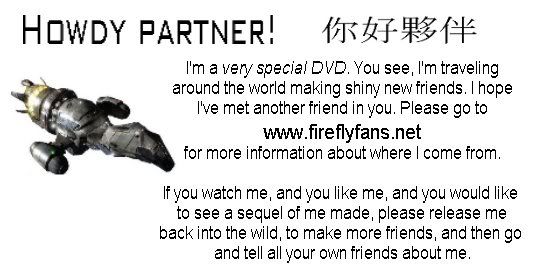 ]
]This can be printed onto any sticky label and affixed to the inside (or outside I suppose) of the DVD case.
I hope this gets off the ground - it sounds like a great way to promote the BDM !!
So buy a copy, put the label on it, and leave it under a tree, or on a bus, or outside your local DVD store! Please!!
NOTIFY: Y | REPLY | REPLY WITH QUOTE | PERMALINK | TOP | HOME

Quote:
Originally posted by kryten3:
I have never 'Crossed, but I want to start with Serenity. So I have taken it upon myself to redesign the Bookcrossing label to suit our DVD.
[IMG]
This can be printed onto any sticky label and affixed to the inside (or outside I suppose) of the DVD case.
I hope this gets off the ground - it sounds like a great way to promote the BDM !!
So buy a copy, put the label on it, and leave it under a tree, or on a bus, or outside your local DVD store! Please!!
You know Kryten3 that is a pretty shiny idea. I think it is a pretty good way to get new people to check out the DVD, come here, and perhaps to help spread the word.
I am going to print some of these off & run a little mission to local video stores to slip them into video cases. No stickers mind as that just wouldn't be right, but small cards with this message on them is bound to generate interest.
__________________________________________
"May have been the losing side. Still not convinced it was the wrong one."
Richmond, VA & surrounding area Firefly Fans:
http://tv.groups.yahoo.com/group/richmondbrowncoats/
http://www.richmondbrowncoats.org
NOTIFY: N | REPLY | REPLY WITH QUOTE | PERMALINK | TOP | HOME
Quote:
Originally posted by BrownCoat1:
I am going to print some of these off & run a little mission to local video stores to slip them into video cases. No stickers mind as that just wouldn't be right, but small cards with this message on them is bound to generate interest.
Although I welcome your enthusiasm and find the idea with the crossings shiny myself, I'd advise against putting stickers that say "Just leave me lying around town after watching me!" on copies at your local video store. They might not like it if you give away their property.

Hm, maybe that sticker would look shinier if it were white letters on black background. Bitch to print, though. I like it the way it is, too.
One day.
One plan.
One army of Browncoats.
On June 23rd, we aim to misbehave.
www.straightfromthehorsesmouth.co.uk/firefly
NOTIFY: Y | REPLY | REPLY WITH QUOTE | PERMALINK | TOP | HOME