

In the garden, and RAIN!!!!
POSTED BY: SIGNYM
UPDATED: Thursday, December 25, 2025 04:27
VIEWED: 1005090
PAGE 462 of 1154
Quote:
Originally posted by Brenda:
That picture of a hard drive is the shape of what is appears to missing from the case.
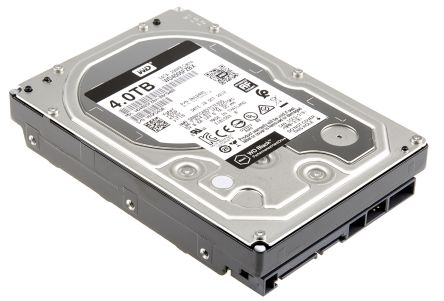
Yeah. That's what I thought you meant. It's got to be inside of there, unless you or somebody else opened up the case and took it out. The computer won't boot up without it because it won't have any Operating System data to load after the initial BIOS checks. That would also mean that everything you've ever saved, including all of your work is gone too if it's not in there. (And also means that you were never able to use the computer or even save your work in the first place if nobody has removed it since).
Not to worry. I'm pretty confident that your hard drive is in the case.
 You wouldn't ever actually see it unless you remove the screws and take the sides off of the case.
Quote:
My is also written out completely on paper and is where I can get at it. I do all my writing long hand before it gets to the ready for computer stage. I mentioned earlier in the thread after I moved that I thought I lost a couple of notebooks with Firefly stories in them. I found them and all was good. So, yeah my book is okay as is all my other writing.
Oh good. Would be a shame to have to type it up again, but at least it's secure. Hopefully it won't come to that.
Quote:
I do have a USB but it only has pictures on it. My IT friend needed me to get one so I could get the pictures from the laptop I bought off of him to put back on my or Blair's system when he flipped the operating system from Linux back to Windows. I still have it as I want to take some other pictures from this thing and keep them, so I can put them onto either Blair's or if I decide to buy a whole new desktop. That thought has crossed my mind in the last couple of years.
When we do get you up and running again, we'll be sure to put all of your work on there too. Chances are that everything you've ever written is smaller than just a handful of pictures you have on the thumb drive. Wouldn't hurt to buy a few more since they're so cheap so you can just back them up and put them somewhere else and have a few copies. Cheap and easy peace of mind.
Quote:
The plug for the mouse and the keyboards are both round. And yes, pink and green coloured.
Yup. That's what I figured.
Do you have ports on the back (and hopefully front) of your case that look like these two horizontal ones on the right that someone is plugging the wire into?
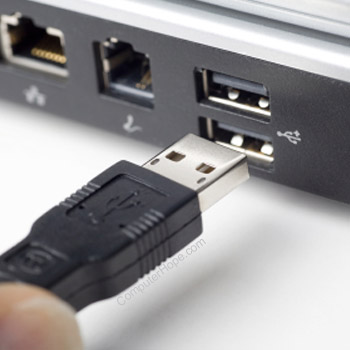
If you do, how many on the back and how many on the front?
I'm pretty sure you can still probably buy a keyboard and mouse with the green/pink circle connectors, but I wouldn't have even looked for them for 15 years or so so I can't say. I'm hoping that your computer has enough USB ports for both a keyboard and mouse on back, and extras for a thumb drive or two (preferably on the front for easy access).
If you only have two, which is unlikely but still possible with the age of the computer, you would be able to still use a USB stick to back stuff up, but you'd have to temporarily remove the keyboard while doing it and only use the mouse functions to copy stuff to the thumb drive, then take it out and plug the keyboard back in.
Quote:
I think I pretty well understand what you are telling me by my matching up the pictures you've posted with what I see on the case.
Cool. Glad to help.
Quote:
Computers were just starting to come in when I was just starting to get out of high school, so you have been around the technology more than I really have. So, I can get a little confused.
No need to explain. Tech got popular on a massive scale really quick. It's kind of like vehicles. Most people use them nowadays, but hardly anybody knows what goes on under the hood.

Do Right, Be Right. :)
NOTIFY: Y | REPLY | REPLY WITH QUOTE | PERMALINK | TOP | HOME

Quote:"on the 57 fwy just south of the 10 fwy" There's the sw side of the interchange with CalPoly Pomona and the se side with that light industrial development. Then there's a whole bunch of weird slopes within the interchange where I swear CalDOT planted a whole bunch of different experimental plants and just let them go to see what would happen, as a literal test bed, perhaps for future fwy plantings. I don't recall seeing them @ either CalPoly or the development, so do you mean within the interchange?
Originally posted by SIGNYM:
KIKI: This is what I might pick out for you:
I've seen stands of red shanks (adenostoma sparsifolium) that are VERY attractive. But they grow in areas that are SO dry ... like, on south and west facing slopes, at elevations where you would NOT expect much extra rain (or any snow) that if you had anything else nearby in your yard that you were watering, you MIGHT kill the red shanks. Places I've seen it: on the 57 fwy just south of the 10 fwy, on the west-facing slope of the eastern side of the 57; and on the west/south-facing lower slopes of the San Jacintos on the road back from Idyllwild.
Chokecherry (prunus virginiana) is upright, like Catalina Island cherry, but much darker green.
California bay laurel (umbellularia californica) has the benefit of killing off understory plants (natural weed control!)
Not a big fan of palo verde or mesquite. Besides, they might not like your area.
If you have space for a large 75' tree, try CA black walnut (juglans californica). It's native to the SG foothills, endangers, and very wildlife friendly.
Of all of them, I would suggest red shanks, if you don't mind keeping that area dry.
-----------
Pity would be no more,
If we did not MAKE men poor - William Blake
#WEARAMASK
There was a particular type of mesquite at work - prosopis alba - that was very pretty. It made a light uniform shade with its multiple tiny leaflets. It's the only kind I've seen irl that I like. But it seems that anything native or introduced in that family - including albizia (mimosa), et al - seed themselves freely and resprout persistently from the roots, and one ends up having a difficult time getting rid of them. I'm STILL trying to get rid of the last of the mimosas from my across the alley neighbor from over a decade ago. I'm not sure if prosopis alba shares that characteristic, but given my experience, I'd be reluctant to try it.
NOTIFY: N | REPLY | REPLY WITH QUOTE | PERMALINK | TOP | HOME

Quote:
Originally posted by 6IXSTRINGJACK:Quote:
Originally posted by Brenda:
That picture of a hard drive is the shape of what is appears to missing from the case.
Yeah. That's what I thought you meant. It's got to be inside of there, unless you or somebody else opened up the case and took it out. The computer won't boot up without it because it won't have any Operating System data to load after the initial BIOS checks. That would also mean that everything you've ever saved, including all of your work is gone too if it's not in there. (And also means that you were never able to use the computer or even save your work in the first place if nobody has removed it since).
Not to worry. I'm pretty confident that your hard drive is in the case.
Okay. I'll tell you right now I think I am back to confused. *sigh* My poor old brain didn't quite get all of that. I think?
Quote:
My is also written out completely on paper and is where I can get at it. I do all my writing long hand before it gets to the ready for computer stage. I mentioned earlier in the thread after I moved that I thought I lost a couple of notebooks with Firefly stories in them. I found them and all was good. So, yeah my book is okay as is all my other writing.
Quote:
Oh good. Would be a shame to have to type it up again, but at least it's secure. Hopefully it won't come to that.
Yeah, I sort of started writing before I got a computer, so I was doing things long hand then typing them out on an actual typewriter. Which I still have.
Quote:
I do have a USB but it only has pictures on it. My IT friend needed me to get one so I could get the pictures from the laptop I bought off of him to put back on my or Blair's system when he flipped the operating system from Linux back to Windows. I still have it as I want to take some other pictures from this thing and keep them, so I can put them onto either Blair's or if I decide to buy a whole new desktop. That thought has crossed my mind in the last couple of years.
Quote:
When we do get you up and running again, we'll be sure to put all of your work on there too. Chances are that everything you've ever written is smaller than just a handful of pictures you have on the thumb drive. Wouldn't hurt to buy a few more since they're so cheap so you can just back them up and put them somewhere else and have a few copies. Cheap and easy peace of mind.
I'll try and remember that or just double check this thread.

Quote:
The plug for the mouse and the keyboards are both round. And yes, pink and green coloured.
Quote:
Yup. That's what I figured.
Do you have ports on the back (and hopefully front) of your case that look like these two horizontal ones on the right that someone is plugging the wire into?
If you do, how many on the back and how many on the front?
I'm pretty sure you can still probably buy a keyboard and mouse with the green/pink circle connectors, but I wouldn't have even looked for them for 15 years or so so I can't say. I'm hoping that your computer has enough USB ports for both a keyboard and mouse on back, and extras for a thumb drive or two (preferably on the front for easy access).
If you only have two, which is unlikely but still possible with the age of the computer, you would be able to still use a USB stick to back stuff up, but you'd have to temporarily remove the keyboard while doing it and only use the mouse functions to copy stuff to the thumb drive, then take it out and plug the keyboard back in.
It looks to me like there are 2 ports on the back of the case and nothing on the front.
Quote:
I think I pretty well understand what you are telling me by my mNOTIFY: Y | REPLY | REPLY WITH QUOTE | PERMALINK | TOP | HOME
Call last night from the head of my mah jong group. It is looking like the senior centre I play it will open again the fall.
NOTIFY: Y | REPLY | REPLY WITH QUOTE | PERMALINK | TOP | HOME
Quote:Oh that's so awesome!
Originally posted by Brenda:
Call last night from the head of my mah jong group. It is looking like the senior centre I play it will open again the fall.
NOTIFY: N | REPLY | REPLY WITH QUOTE | PERMALINK | TOP | HOME
I still need to crack an egg into each bowl and bake them, but the shakshoukah came out wonderfully!
I was very careful this time making it, cooking things separately and combining them at the end, because I didn't know how forgiving it would be. Next time I'll know how to save myself some time by putting everything together in one pot to slow cook, before I portion it out and cook the egg on top.
I was surprised at how sweet it turned out to be. Not unpleasantly so, just unexpected. Between the red bell and baby red sweet peppers, the onions, and the tomatoes, I guess there was enough sugar. So another thing I'm going to do next time is add a lot more garlic and spices. Plus one variation that I didn't do this time is to make it spicy. I like spicy ...
NOTIFY: N | REPLY | REPLY WITH QUOTE | PERMALINK | TOP | HOME
Quote:Oh that's so awesome!
Originally posted by 1KIKI:Quote:
Originally posted by Brenda:
Call last night from the head of my mah jong group. It is looking like the senior centre I play it will open again the fall.
It will be.
Kiki, I'm glad you understood that because I just reread what I typed and man, is it a hash.
NOTIFY: Y | REPLY | REPLY WITH QUOTE | PERMALINK | TOP | HOME
Eh --- I got your drift!
NOTIFY: N | REPLY | REPLY WITH QUOTE | PERMALINK | TOP | HOME
Kiki, I'm glad you did.
NOTIFY: Y | REPLY | REPLY WITH QUOTE | PERMALINK | TOP | HOME
Quote:
Originally posted by Brenda:Quote:
Originally posted by 6IXSTRINGJACK:Quote:
Originally posted by Brenda:
That picture of a hard drive is the shape of what is appears to missing from the case.
Yeah. That's what I thought you meant. It's got to be inside of there, unless you or somebody else opened up the case and took it out. The computer won't boot up without it because it won't have any Operating System data to load after the initial BIOS checks. That would also mean that everything you've ever saved, including all of your work is gone too if it's not in there. (And also means that you were never able to use the computer or even save your work in the first place if nobody has removed it since).
Not to worry. I'm pretty confident that your hard drive is in the case.Quote:
Okay. I'll tell you right now I think I am back to confused. *sigh* My poor old brain didn't quite get all of that. I think?
Yeah. Sorry. Too many words. I get that a lot.
THE IMPORTANT PART: Unless you or somebody else physically removed the hard drive from the case before the computer stopped working, it's still in there. It's a necessary part for the computer to run. You can't see it from outside the case, and if you never open computer cases you wouldn't know that it was in there.
LESS IMPORTANT, BUT GOOD TO KNOW: You know those "Thumb Drives" we're talking about to back up your written work on along with your photos? A hard drive is essentially the same thing as those, except they are capable of storing a great deal more data than the thumb drives, but they are also more prone to damage from heat or from being dropped because of all of the mechanical parts inside of them.
Quote:
My is also written out completely on paper and is where I can get at it. I do all my writing long hand before it gets to the ready for computer stage. I mentioned earlier in the thread after I moved that I thought I lost a couple of notebooks with Firefly stories in them. I found them and all was good. So, yeah my book is okay as is all my other writing.
Quote:
Oh good. Would be a shame to have to type it up again, but at least it's secure. Hopefully it won't come to that.
Quote:
Yeah, I sort of started writing before I got a computer, so I was doing things long hand then typing them out on an actual typewriter. Which I still have.
I can't even read my own handwriting half the time. I envy your ability to do so.
Quote:
I do have a USB but it only has pictures on it. My IT friend needed me to get one so I could get the pictures from the laptop I bought off of him to put back on my or Blair's system when he flipped the operating system from Linux back to Windows. I still have it as I want to take some other pictures from this thing and keep them, so I can put them onto either Blair's or if I decide to buy a whole new desktop. That thought has crossed my mind in the last couple of years.
Quote:
When we do get you up and running again, we'll be sure to put all of your work on there too. Chances are that everything you've ever written is smaller than just a handful of pictures you have on the thumb drive. Wouldn't hurt to buy a few more since they're so cheap so you can just back them up and put them somewhere else and have a few copies. Cheap and easy peace of mind.
Quote:
I'll try and remember that or just double check this thread.
Or just ask me. I'm sure I'll be around for a while.
Quote:
The plug for the mouse and the keyboards are both round. And yes, pink and green coloured.
Quote:
Yup. That's what I figured.
Do you have ports on the back (and hopefully front) of your case that look like these two horizontal ones on the right that someonNOTIFY: Y | REPLY | REPLY WITH QUOTE | PERMALINK | TOP | HOME