

In the garden, and RAIN!!! (2)
POSTED BY: SIGNYM
UPDATED: Monday, September 7, 2026 11:50
VIEWED: 338648
PAGE 804 of 834
Quote:
Originally posted by Brenda:
Oh, SIX the only icon on the start page not to come up was ADOBE reader but I don't really use it. Course it maybe back now.
I don't really know what that means, Brenda.
I'll try to take a guess...
By "Start Page" do you mean the "Desktop"?
Desktop is the official name for your screen after you boot up and login. It's got your background with icons on it, and the Task Bar at the bottom.
If that's the case, are you saying that you've got icons for regularly used programs on the Desktop, but the Adobe one isn't showing up for some reason?
This could be due to the same issue that is causing your Task Bar to flake out. Hopefully a legit restart fixes this.
--------------------------------------------------
Those who dance always seem crazy to those who can't hear the music.
NOTIFY: Y | REPLY | REPLY WITH QUOTE | PERMALINK | TOP | HOME
Only 8 boxes left in the attic now.
One is my receiver that I don't want to put in the garage until I get a good dust cover for it and I'm ready to set all that up out there. The 2nd is the box with the VCR, a few tapes and my chess board (which I'm starting to think I don't have any pieces for anymore). 3rd is my box of nostalgia that isn't ever getting thrown out. 4th and 5th are the Christmas boxes. 6th is my box for building computers. And the last two are the two giant totes of black and white photos.
I think for now, that's all going to be packed up neatly and waiting for the next step.
I've got plenty of room to work on stuff in the small bedroom now and still have easy access to that hole in the closet to work on capping it off, so I don't really want to bring any more down until I get moving on clearing stuff out of that bedroom. I don't want any spillover into other rooms.
I found a really old Lenovo notepad that my brother was using in the mid-2000's and gave me when he didn't need it anymore. I've never used it. And apparently I can't find the power brick for it, which really sucks. I probably could have made something cool with it. I'll keep it around for now as I might find the cord in another box along the way. Worst case I could probably at least get the hard drive out of there and do something with it, but I'm going to take a guess that this thing probably had a hard drive so small it's not worth the trouble or even the cost to buy another case for it.
I also found a large portable drive my brother must have given me and I have no memory of. I was shocked to see that it fired right up, but it's only got a 150GB hard drive in it. It's nonsensical to even have that thing in 2026 since I have 5 small external drives now that were made from old laptop drives that range from 250GB to 1TB and they're powered up simply by plugging them into the computer without the need for plugging them into the wall like this one.
I can't even imagine I'd benefit from putting a larger drive in there. Even if I put a 1TB drive in there, which is the largest desktop drive I have on hand, it's a chore to be plugging that thing into the wall nearby the computer just to use it. If I had a 1TB drive that didn't have a home, that might be one thing, but in order to put one in this case right now, I'd have to take one out of one of my computers to do it and that is just stupid.
I think I might see if my buddy wants it, but really I don't even want to do that. I had planned on giving him my smallest/slowest laptop drive enclosure out of the batch I recently made to help him move his stuff, and that's twice the space while being about 1/4 the physical size and doesn't require power from the wall.
I hate throwing this thing out. But really... What else would I do? It must have been made well, because this thing would have been in stores around 2005 and it's still working just fine today even though it's spent the good deal of the last 15 years in my attic.
I just dismantled about 30 hard drives last month to harvest the magnets and separate the aluminum for recycling. They were all 120GB and useless to me. Why keep this one with 30 extra GB when I've got a stupid little thumb drive with almost as much space.
--------------------------------------------------
Those who dance always seem crazy to those who can't hear the music.
NOTIFY: Y | REPLY | REPLY WITH QUOTE | PERMALINK | TOP | HOME

Quote:
Originally posted by 6ixStringJack:
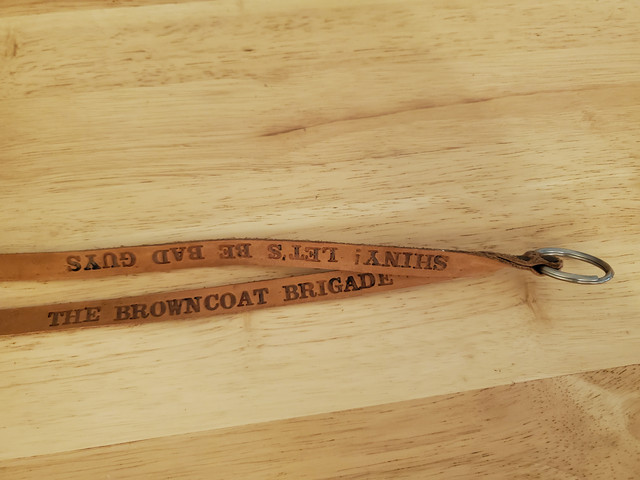
Shiny! Let's be good guys
My brother wore that to work everyday as his replacement lanyard for our keycard badges. It's the only Firefly memorabilia I own. Takes up so little space I guess I never got rid of it.
And I knew I'd find that picture of the 3 gay chefs my brother and sister in law gave me after they were out antiquing along with the statue.
--------------------------------------------------
Those who dance always seem crazy to those who can't hear the music.


A friend of mine got a Serenity keychain. I have never used. Still in its packaging.
That picture is cute and so is the ornament.
My mum used to collect salt and pepper shakers. She had a set that are most like older than me. Cowboy boot or headstones. One says, "Here lies salt" and the other one, "Here lies pepper."
NOTIFY: Y | REPLY | REPLY WITH QUOTE | PERMALINK | TOP | HOME
Quote:
Originally posted by 6ixStringJack:Quote:
Originally posted by Brenda:
I got the widget thing to come as an answer to a question. Don't remember what though.
Yeah... It's a problem I never have because when I install windows it's among the whole ton of things that I disable. I didn't realize how buggy the feature was because of this. If we continue to have issues down the road, we might have to find an alternative for your weather that isn't integrated directly with your taskbar which is too important to be glitching out for the weather updates.Quote:
I will write it down. So I don't forget. And will let you know how long it lasts.
Yeah... I'm still foggy about what exactly you've done so far, so I'm half-convinced that you haven't actually forced a legit Windows restart yet. This could fix the problem.Quote:
Appreciate the help. Everyone around me in RL seems to be tired of answering my questions.
No worries.Quote:
Will watch the video when I get back today Professor.I know I've come across Explorer.exe when I've been looking for a solution to all of this.
The video is only 17 seconds long, but it basically shows you what might take me 3,000 words or more to get across for you. If you find it's going too fast when you watch it, I can go into more detail about what he's doing, but you can see how quick and easy it actually is.
--------------------------------------------------
Those who dance always seem crazy to those who can't hear the music.
Sometimes I just go to a weather site that can tell what will hopefully be happening for two or three days.
I've done the turn off monitor and drive then turn every thing back on. These last two times I've done the control-alt-delete.
Saw it and I know you have told me about that to control-alt-esc too.
NOTIFY: Y | REPLY | REPLY WITH QUOTE | PERMALINK | TOP | HOME
Quote:
Originally posted by Brenda:Quote:
Originally posted by 6ixStringJack:Quote:
Originally posted by Brenda:
I got the widget thing to come as an answer to a question. Don't remember what though.
Yeah... It's a problem I never have because when I install windows it's among the whole ton of things that I disable. I didn't realize how buggy the feature was because of this. If we continue to have issues down the road, we might have to find an alternative for your weather that isn't integrated directly with your taskbar which is too important to be glitching out for the weather updates.Quote:
I will write it down. So I don't forget. And will let you know how long it lasts.
Yeah... I'm still foggy about what exactly you've done so far, so I'm half-convinced that you haven't actually forced a legit Windows restart yet. This could fix the problem.Quote:
Appreciate the help. Everyone around me in RL seems to be tired of answering my questions.
No worries.Quote:
Will watch the video when I get back today Professor.
The video is only 17 seconds long, but it basically shows you what might take me 3,000 words or more to get across for you. If you find it's going too fast when you watch it, I can go into more detail about what he's doing, but you can see how quick and easy it actually is.
--------------------------------------------------
Those who dance always seem crazy to those who can't hear the music.
Sometimes I just go to a weather site that can tell what will hopefully be happening for two or three days.
I've done the turn off monitor and drive then turn every thing back on. These last two times I've done the control-alt-delete.
Saw it and I know you have told me about that to control-alt-esc too.
Good grief. I've gone blue on you again. Sorry. But I do appreciate the help.
NOTIFY: Y | REPLY | REPLY WITH QUOTE | PERMALINK | TOP | HOME
Quote:
Originally posted by 6ixStringJack:Quote:
Originally posted by Brenda:
Oh, SIX the only icon on the start page not to come up was ADOBE reader but I don't really use it. Course it maybe back now.
I don't really know what that means, Brenda.
I'll try to take a guess...
By "Start Page" do you mean the "Desktop"?
Desktop is the official name for your screen after you boot up and login. It's got your background with icons on it, and the Task Bar at the bottom.
If that's the case, are you saying that you've got icons for regularly used programs on the Desktop, but the Adobe one isn't showing up for some reason?
This could be due to the same issue that is causing your Task Bar to flake out. Hopefully a legit restart fixes this.
--------------------------------------------------
Those who dance always seem crazy to those who can't hear the music.
Yes, I do mean the desktop. Sorry.
Yeah, background icons came up with taskbar but not the Adobe reader but like I said I don't use it. And it is only on the desktop, not the taskbar.
NOTIFY: Y | REPLY | REPLY WITH QUOTE | PERMALINK | TOP | HOME
All done for today and some of the haze is gone. Had a bit of nice breeze at times too.
NOTIFY: Y | REPLY | REPLY WITH QUOTE | PERMALINK | TOP | HOME
Quote:
Originally posted by Brenda:
Yes, I do mean the desktop. Sorry.
No worries, Brenda.
But if you can remember, try to use the correct terms for them just because they are universal and everyone will know what you're talking about if you use them when you're asking for help.
I'm a pretty patient guy, especially when I'm posting here and I've got the time. But you mentioned about people losing patience helping you and I think knowing little things like these exact names instead of trying to explain a picture of your screen or using the wrong terms will help you out greatly in getting some help from other people.
Quote:
Yeah, background icons came up with taskbar but not the Adobe reader but like I said I don't use it. And it is only on the desktop, not the taskbar.
I did a little research on this and it could be because of several things over time. Adobe has been known to do updates to its program where it changes locations of the executable. This could have been any time in between the REAL restart you just now did and whenever the last time you did a restart like that (assuming that you ever did???). When this happens, the link on your Desktop for that program now points to nothing and we'd call that a "Broken Link".
So when Windows actually does a restart, it cleans a lot of caches that it has built up all around and one of them is all the desktop shortcut links you have. Unlike older versions of Windows back in the day that would just leave broken links on your Desktop until you manually removed them, Windows will catch any broken links on your desktop that are broken and throw them in the trash for you.
As long as that's your only issue, we should be good. Fingers Crossed.
BTW... Do you have any idea how long ago you did a "Restart" on your computer like you did just last night? Have you ever restarted the computer before?
I mean in this fashion. Not using the physical power button on the case, letting it fall asleep or forcing it to "Sleep" or "Shut Down".
--------------------------------------------------
Those who dance always seem crazy to those who can't hear the music.
NOTIFY: Y | REPLY | REPLY WITH QUOTE | PERMALINK | TOP | HOME
Oh... and another lesson...
When I talk about how Windows builds up a lot of caches over time, such as the icons and items on your Desktop, you should know that these caches eventually start taking up more and more RAM, which is your quick Memory.
Windows as well as programs you run use this quick memory to store important processes as well as things that are going to be accessed very frequently because it's much faster to draw the information from the energized memory stick than it is to get it from the much slower hard drive. ESPECIALLY on a mechanical hard drive with discs and platters like the one I'm almost certain is in your computer.
Other caches that Windows would build up is thumbnails for any of your images you had in folders. These are the small icons of your photographs you would see in Explorer. Rather than use up processing power every time you open a folder with pictures inside of it, it will make a small internal database with all the miniature thumbnail images it made to draw from and it's much faster and less taxing on the system.
These caches are great...
Until they're not.
There's no such thing as the Perfect Program. Especially because unlike Apple computers where they make all of their own hardware, everybody has a different PC with different component parts inside of it. It's actually quite amazing that we can get so many millions of different machines to basically run the same way once an operating system like Windows is installed on them.
But what happens with these caches and just the overall stability of Windows over time is that everything starts to degrade at some point. The caches get too large and Windows glitched out and stopped purging things from them that it should be.
Basically, the house of cards starts falling in on itself if you go too long without a real Restart.
And when you do that Restart, you're erasing all of that junk. All of those caches that you weren't even aware existed but kept everything running smoothly are now reset back to their default image.
Like a Phoenix rising from the ashes.
Now... It will have to rebuild a lot of these caches on a restart. Part of that is happening in that agonizingly slow boot process. But the longer you go without a restart it's always rebuilding and optimizing things... a lot of it based off of your behavior and how you use your machine. Like if you had a lot of movies and pictures and went into those folders, it will rebuild those images caches for you again. That takes processing power and time, but the next time you go to that folder in between restarts, it will instantly load all of those thumbnail images for you from the cache rather than rebuilding them every time.
But it's okay... You can still be doing other things when it's rebuilding this stuff, and chances are especially how light you use your computer, you can go a VERY long time before another Restart and it won't have to start rebuilding everything until the next one.
It's kind of cool. It's almost like it's a living animal, but it's not. As long as no situational change has been made, it will behave exactly the same every time because that is how it's programmed to.
But eventually it gets dumb and unpredictable once the glitches start piling up. If you're noticing the glitch, it's probably because Windows stopped being able to fight against an army of them that just kept growing.
It essentially dies...
To be reborn again after you do that proper Restart.
--------------------------------------------------
Those who dance always seem crazy to those who can't hear the music.
NOTIFY: Y | REPLY | REPLY WITH QUOTE | PERMALINK | TOP | HOME
My Aunt's hope chest is done.
The hinges were not easy to get on, but I figured out a way to do it without screwing anything up. I didn't realize that the way the old hinges worked, the piece was quite a bit "off" of itself in the back, and the front of it is the only place that it met the bottom.
That turned out to be pretty great for 2 reasons, actually...
The first is that now I was able to add 2 rubber dome bumpers on the front corners of the lid and now that will be the only contact point from lid to body. So instead of needing wax paper all around to protect them from fusing together for the next 30 or so days, we just need two little squares of wax paper.
The second is that the one problem I was worried about almost became a non-issue. I was aware that both the front and back of the chest had swelled out slightly, and the same had not happened to the lengths of the lid. But I thought it was much more pronounced than it was, and it was because on top of that the lid was actually coming slightly back in on itself before resting on the body, making the difference between the bowed body and the unbowed lid even more pronounced.
Now I can barely even tell it exists, and I saw it every second of every day I was looking at those boxes and wondering if I was going to regret having not tried to use some furniture clamps on them for about a year before I even started stripping the thing.
--------------------------------------------------
Those who dance always seem crazy to those who can't hear the music.
NOTIFY: Y | REPLY | REPLY WITH QUOTE | PERMALINK | TOP | HOME