

PhotoShop talk
POSTED BY: PhoenixRose
UPDATED: Wednesday, February 28, 2007 06:51
VIEWED: 3873
PAGE 1 of 2
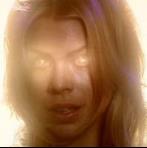
So asarian and I have been talking a bit off-board about PhotoShop and blending and things that are very interesting if you actually know what I'm on about, so I thought I'd start a thread to more easily talk with him (waves at asarian) and anyone else who might want to jump in to learn or to teach (waves at anyone else who has PhotoShop)
So it started with a question about how I do near-seamless blends, and this is what I have on that:
Rule number one is to have a good eye. Rule number two is to have patience for miles. Okay, on to the actual PhotoShop tools…
I usually start with the magic wand selector and select the background (though I use the box selector for any big patches where I can get away with it). Often the sensitivity of the wand need to be adjusted. Between 15 and 30 seems to be good. Sometimes something on the subject to be isolated will be too close to the color of the background, and then you need to zoom in (the magnifying glass is your good friend) and use the lasso selector. Or you can leave it and use the eraser later. Both are detail work and tend to be pretty time-consuming, so it’s a matter of preference.
Once as much of the background as possible is selected, go to ‘select’ on the menu and go down to ‘inverse’. The subject is now selected, and you copy (Ctrl+C)
Now you go to your new image; whatever background you want to put the subject in. First order of business is to erase any remaining artifacts of background from around the subject. For this I recommend a fairly small, fuzzy-edged eraser tool, to be traced around the subject as closely as possible without deleting any of them. Let up on the mouse key often so you won’t lose all your work if you have to undo.
Blending of hair:
For blending hair, I use a very small eraser (2 or 3 pixels) and zoom in very close. I also turn the opacity of the eraser down to about 80%-60% and sometimes less. Then I erase any of the background that peeks through or around the hair. There are parts I run over twice so that they’re totally gone, and closer to the edges I just erase at the 80% so it looks more realistic. (I tried to use layer masks and they drove me absolutely batty with frustration. I could never get them to work just right and it could take hours and hours to blend and it never looked as good as I wanted it to. As soon as I learned about the changable transparancy on the eraser, it was like my world opened up and breathed again. It worked the same as the layer mask, only without the frustration and extra steps.)
For all types of outline, the blur tool is your friend. Also the smudge tool. The smudge tool can replace small details around the edges that might have been lost in isolation, just by smudging the skin/clothes/hair outward. This takes the good eye and the patience in spades because there will likely be many undos until you get it just right. The blur tool makes the edges fuzzy so that they blend into their surroundings. The good eye is also required here because you don’t want the entire outline to be blurry or anything to be over-blurred. You can change the strength of the blurring; I usually keep it around 50% or lower unless I’m trying to fix bad pixelation, which requires higher strength in most cases. Anyway, that’s a different subject.
Always, always, I zoom in as close as I comfortably can for maximum detail.
So, that’s what I can think of in a nutshell. If you have any questions, just ask and I’ll do my best to tackle them.
So, there it is. I posed a question to asarian about a fish-eye effect he used in one of his pictures through e-mail. Please share, asarian 

 []
[]
NOTIFY: N | REPLY | REPLY WITH QUOTE | PERMALINK | TOP | HOME

Similar topic:
I have a PC at work, on wich I did my sig banner (shhhhhh, don't tell) using MS Paint.
I have an iMac at home that has no graphics manipulating ability at all.
Which software would be for a complete noob like me? I imagine the full Adobe illustrator or Photoshop would do it, but I don't have a student ID (monster huge discount) or the $500ish needed to buy.
----------
Vote for Firefly http://www.richlabonte.net/tvvote/index.html 
Sign up NOW! http://fireflyfans.net/thread.asp?b=11&t=25704
More Information: http://76thbaattalion.homestead.com/index.html
NOTIFY: Y | REPLY | REPLY WITH QUOTE | PERMALINK | TOP | HOME
I have to say that's pretty gorramn impressive for Paint.
The program you'd need would depend on what you want to do with it. Illustrator is very different from PhotoShop in terms of what it can do. It's great for logos, for example, but can't do anything with pictures. And, as you said, the Adobe programs are hellaciously expensive (which is why I only have one of them)
I've heard a few good things about a freeware program called Gimp (I think that's right) It doesn't have all the tools as PhotoShop, but it does have layers, which is always a plus. I'm not familiar with its capabilities beyond that, though.  []
[]
NOTIFY: N | REPLY | REPLY WITH QUOTE | PERMALINK | TOP | HOME
Thank you for the kind words. I can't take all the credit, the 76th logo was done by someone else. I just added the borders and text.
I've used GIMP before, on a Linux machine. I'll see if I can track it down again.
Maybe that for photomanipulation, and save pennies for Illustrator.
Thanks!
----------
Vote for Firefly http://www.richlabonte.net/tvvote/index.html
Sign up NOW! http://fireflyfans.net/thread.asp?b=11&t=25704
More Information: http://76thbaattalion.homestead.com/index.html
NOTIFY: Y | REPLY | REPLY WITH QUOTE | PERMALINK | TOP | HOME

Flatop,
There is also the free "Paint .NET" for the PC. Nothing as advanced as adobe but far and away from regular Paint. Version I have at least lets you do layers and has a history, among other things. Requires, of course, the .NET framework, not sure if it installs this for you if it is not detected.
http://www.getpaint.net/index2.html
anyway, better than paint. 
latest vid
the lyrics http://www.greenplastic.com/lyrics/lucky.php
NOTIFY: Y | REPLY | REPLY WITH QUOTE | PERMALINK | TOP | HOME

Quote:
Originally posted by FlatTop:
Similar topic:
I have a PC at work, on wich I did my sig banner (shhhhhh, don't tell) using MS Paint.
I have an iMac at home that has no graphics manipulating ability at all.
Which software would be for a complete noob like me? I imagine the full Adobe illustrator or Photoshop would do it, but I don't have a student ID (monster huge discount) or the $500ish needed to buy.
You can get Photoshop Elements, which is a somewhat streamlined version of the full Photoshop program. The program costs around $80 to $90, which is a lot less expensive than the full pro version.
Often Photoshop Elements is included as an extra with scanners or digital cameras, which is a really nice bonus item.
Here's the link to the "Photoshop Family" page on the Adobe website for more info:
http://www.adobe.com/products/photoshop/family.html
11th Hour
>>>}———————————————)))======<[]>======(((———————————————{<<<
"Because teenage pranks are fun when you're about to die!" - Hoban Washburne
Firefly/Serenity Guerilla Marketing Posters ~ http://the11thhour.home.att.net
Cafe Press Shop ~ http://www.cafepress.com/11thhourart

Spread the word today ~ Give the gift of Firefly: http://www.apple.com/itunes
NOTIFY: Y | REPLY | REPLY WITH QUOTE | PERMALINK | TOP | HOME
I'm actually reading a very shiny book on PhotoShop Elements right now, and it sounds like it has a few options and tools that PhotoShop doesn't have. Does that seem right to you? Well anyway, I'd like to get it. []
NOTIFY: N | REPLY | REPLY WITH QUOTE | PERMALINK | TOP | HOME
I wonder... should I have posted this in the Blue Sun Forum? Do the photoshop artists all hang out over there?
Happy New Year
NOTIFY: N | REPLY | REPLY WITH QUOTE | PERMALINK | TOP | HOME
Just got PhotoShop today, I was gonna grab a Quickstart guide but I don't really want to get out of my chair. I'll post later if I have any problems (which is likely). I do have quite a few ideas which will eventually make their way to the Blue Sun Room.


~~~~~~~~~~~~~~~~~~~~~~~~~~~~~~~> Scorpion owns all <~~~~~~~~~~~~~~~~~~~~~~~~~~~~~~~
NOTIFY: Y | REPLY | REPLY WITH QUOTE | PERMALINK | TOP | HOME

Quote:Try the Spherize filter under the filter->distort->Spherize menu.
Originally posted by PhoenixRose:
So, there it is. I posed a question to asarian about a fish-eye effect he used in one of his pictures through e-mail. Please share, asarian
More insane ramblings by the people who brought you beeeer milkshakes!
No one can see their reflection in running water. It is only in still water that we can see.

NOTIFY: Y | REPLY | REPLY WITH QUOTE | PERMALINK | TOP | HOME