

Blue Sun Room GRAPHICS - IMAGE

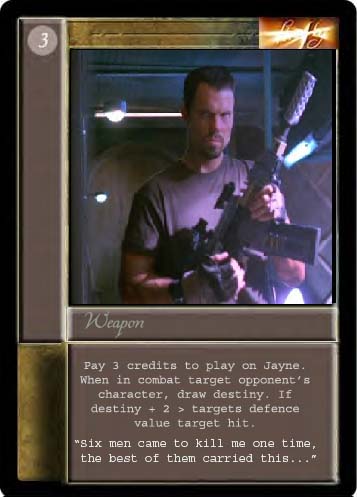
Vera for CCG
Wednesday, January 28, 2004
I just played around with Photo shop a little and made this. I don't know how to do that cool text thing for the title but I think you all get the picture. I used a Star Wars weapons for the basis.
CATEGORY: GRAPHICS TIMES READ: 3030 RATING: 10.0 (G) SERIES: FIREFLY
Comments


Wednesday, 28 January 2004 22:13
Oh, just read you comments.
Use the 'move tool' and put the tool outside the selected image (or in this case text). You should see an arced arrow. Left click and while holding that down you can turn the image or text. I believe it is called rotating. Then simply use the 'move tool' again to place the text in the right spot.
I hope that helps.
Use the 'move tool' and put the tool outside the selected image (or in this case text). You should see an arced arrow. Left click and while holding that down you can turn the image or text. I believe it is called rotating. Then simply use the 'move tool' again to place the text in the right spot.
I hope that helps.
Wednesday, 28 January 2004 22:15
Oh, and if you can't figure it out then I could do it for you. Just say something if you need help.

Wednesday, 28 January 2004 22:15
Cool...but it looks like you need to stretch your images horizontally (maybe 125%?)

Wednesday, 28 January 2004 22:54
Like the quote, but I'd think it'd be cooler is it said "So does this! I call her Vera" Very shiny, though.
Post Your Comments
You must log in to post comments.